 Search Tips
Managed Documents Components
Managed Documents are the central repository of company templates. These templates are stored and can be distributed easily using any of the IPM documents designed to distribute artifacts.
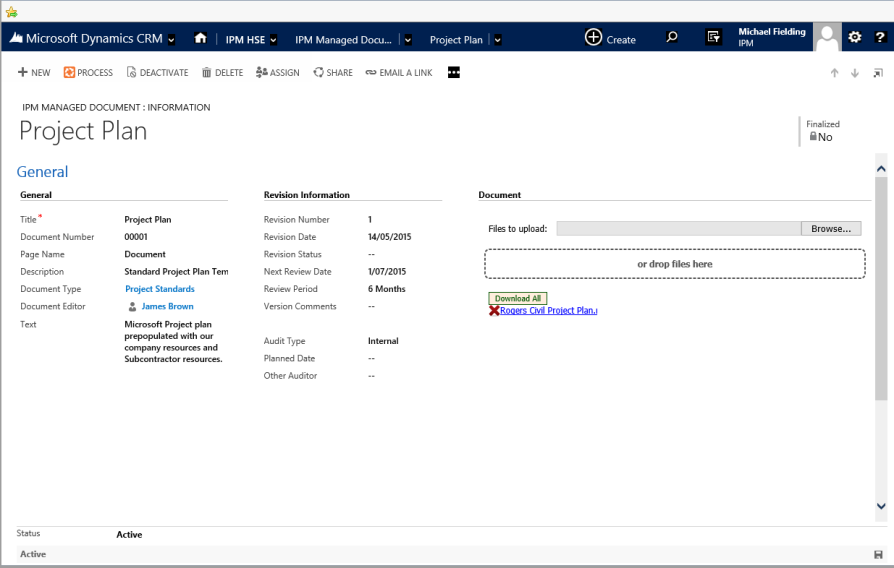
The components of Managed Documents are presented in the image below.
General
The general section is used to describe the purpose of the managed document.
- Title - The general description of the document.
- Document Number - IPM will generate the document number based on the numeration settings.
- Description - A longer description of the document.
- Document Type - A drop down list which is used to classify documents for reporting.
- Document Editor - The original or current editor of the document.
Revision Information
- Revision Number - The latest revision number. This field is automatically incremented when a new revision is added.
- Revision Date - The date of the latest revision,
- Revision Status - A drop-down list that can be used to identify the current status of the document if an approval process is required for the document
- Next Review Date - The date that this document should be reviewed. To be used for reporting and dashboard reminders.
- Review Period - Can be used to automate the calculation of the next review date.
- Version Comments - General Comments about changes in the latest version.
- Audit Type - If the document is audited, whether the Audit is internal or 3rd Party.
- Planned Date - The date of the next audit.
- Other Auditor - If there is a specific Auditor for this document.
Document
The IPM Drag and Drop Document storage component.